Qatar ID Check is simple and easy to use on the Ministry of Interior (MOI / وزارة الداخلية) website. By entering your 11-digit QID number, you can instantly verify your Qatar ID validity online. This quick check helps ensure uninterrupted access to essential services like banking, government facilities, and employment verification. Regularly monitoring your QID status online allows you to keep it up to date and avoid last-minute renewal complications.
Many users face errors while checking Qatar ID online. This guide will help you check your QID status and fix common problems easily.
MOI Qatar ID Status Check Online

How to Check Qatar ID Online?
Checking your Qatar ID online is very simple. The Ministry of Interior (MOI) provides multiple easy methods so every resident can quickly verify their QID status, validity, and expiry date.
You can choose any of the following methods based on your situation:
1. Check Qatar ID by QID Number
This is the most common and fastest method. You only need your 11-digit Qatar ID number to check your status on the MOI portal.
2. Check Qatar ID by Passport Number
If you don’t have your QID number, you can still check your status using your passport number along with your nationality.
3. Check Qatar ID via Metrash App
You can also use the official Metrash mobile app to check your QID details anytime from your phone. (Note: The old Metrash2 app is no longer available. Make sure to use the updated Metrash app.)
You can check your Qatar ID online by QID Number or Passport Number. All the methods I will explain in detail here will help you understand and follow the process step-by-step at MOI’s online portal for checking your MOI QID status.
Before You Start (Important Tips)
Before checking your Qatar ID online, make sure you have the correct details. Small mistakes can show errors or no results.
Here are a few simple things to check:
- Make sure your QID or passport number is correct
- Use a stable internet connection
- Enter details slowly and carefully
- Avoid checking during busy hours (evening time)
Tip: If the website shows an error, wait a few minutes and try again.
MOI Qatar ID Check Online by ID Number Using the MOI Website
Qatar ID Check process is very easy and simple to follow these steps:
Step 1: Visit the official “MOI” website.
Visit the official Ministry of Interior website to inquire about Qatar ID (www.moi.gov.qa).
Step 2: Select Your preferred language
MOI website offers language options in both “English” and “Arabic”. You can choose the language that feels most comfortable to you.

Step 3: Enter the QID Number
Please enter the “11-digit QID” number on your ID card.

Step 4: Verify the Captcha
Enter the “Verification Code” from the image or audio.
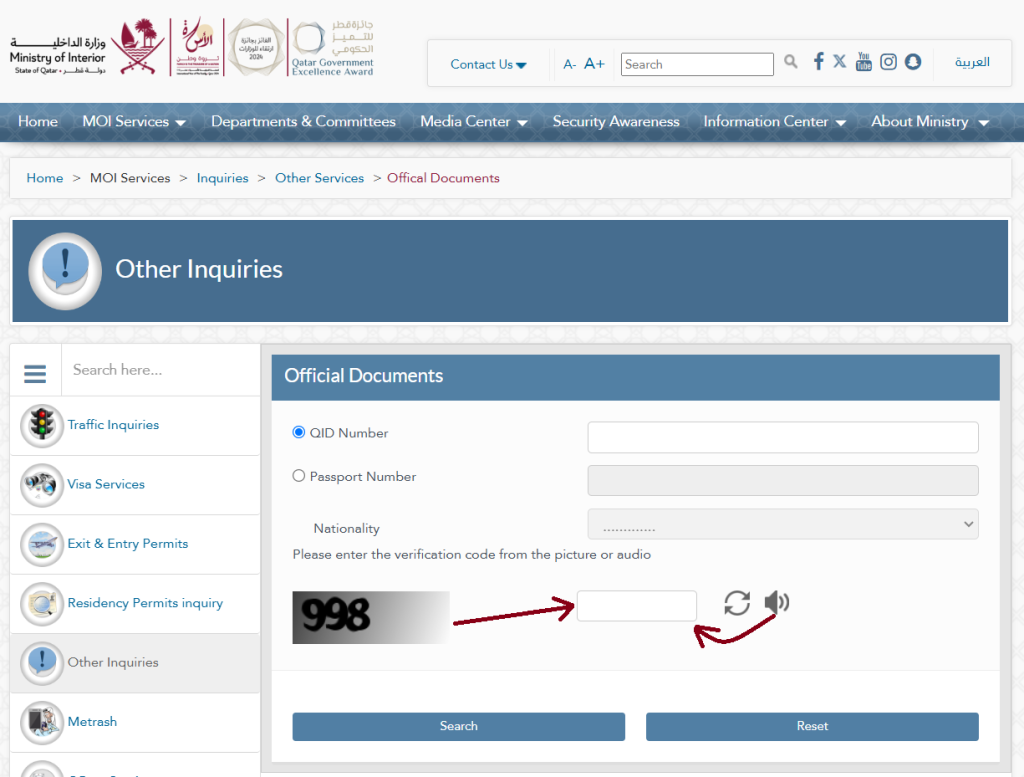
Step 5: Click on the “Search” button
Once you have entered your QID number and verified the captcha, click the “Search” button.
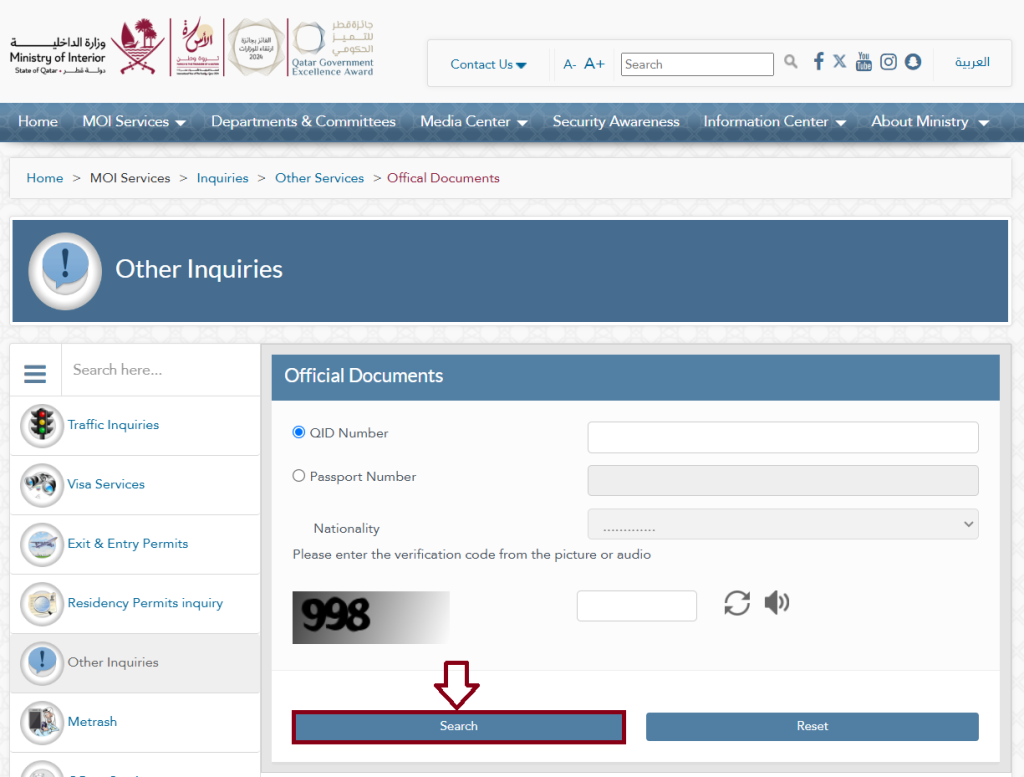
Step 6: Check your status
After providing your information, you will see your QID status. You can check the expiration date of your Qatar ID, passport, residency, and other government documents.

Important Note: Entering your ID number accurately is crucial. Reset your search on the MOI website and re-enter the correct QID number if you receive an error or no results appear.
MOI Qatar ID Check by Passport Number
If you don’t have your QID, follow these steps using your passport:
Step 1: Visit the official “MOI” website.
Visit the official Ministry of Interior website to inquire about Qatar ID (www.moi.gov.qa).
Step 2: select your preferred language
MOI website offers language options in both “English” and “Arabic”. You can choose the language that feels most comfortable to you .
Step 3: Enter your “Passport Number”
Please enter your “Passport Number” in the appropriate field.

Step 4: Select your “Nationality”
Drop down the list to choose your nationality.

Step 5: Verify the Captcha
Enter the verification code from the image or audio.

Step 6: Click on the “Search” button
Once you have entered your Passport number and verified the captcha, click the “Search” button.
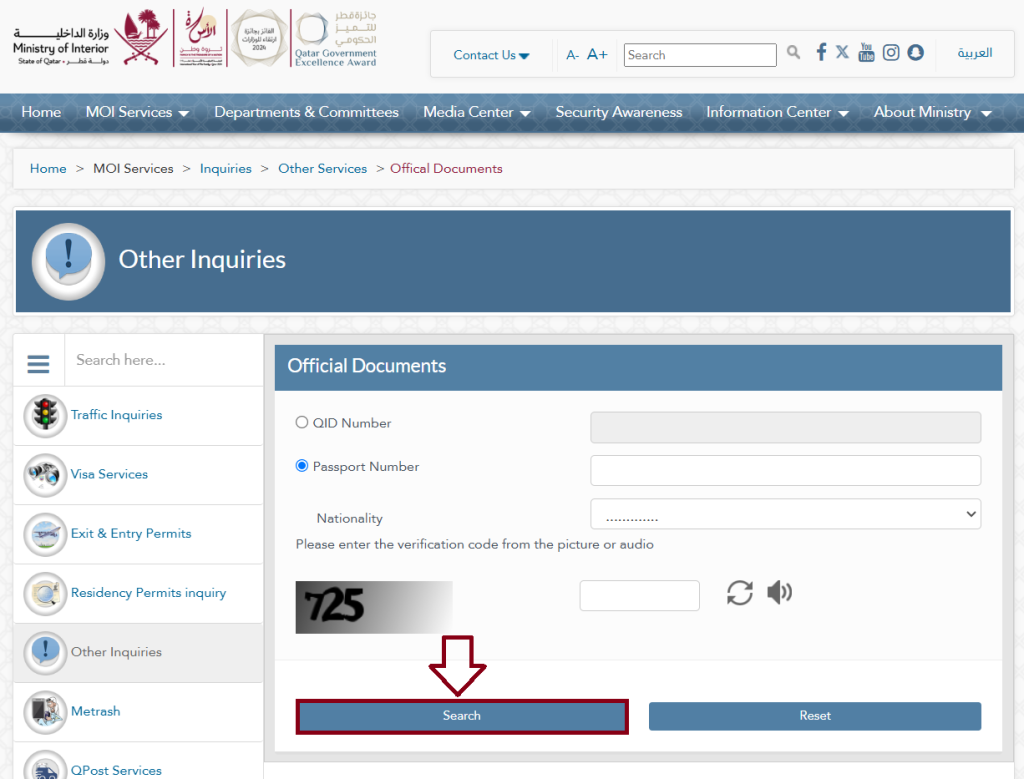
Important Note: Entering your passport number accurately is crucial. Reset your search on the MOI website and re-enter the correct passport number if you receive an error or no results appear.
Qatar ID Check Using the Metrash App
Using Metrash, residents of Qatar can access MOI services through their devices for free. Through this application, you can check the status of your QID, license, vehicle permit, settlement of traffic violations, etc., from the comfort of your own home.
Follow these steps to check your QID status on Metrash:
Step 1: Install the Metrash App
Install the “Metrash” app from the “Play Store” and “App Store“. Your mobile device will be able to access the application once it has been installed.


Step 2: Metrash App Login
Log in with your QID or face ID now. You will receive a message from Metrash once you have successfully logged in.

Step 3: Click the wallet tab
Go to the wallet. A screen will appear where you can find any government documents you own.
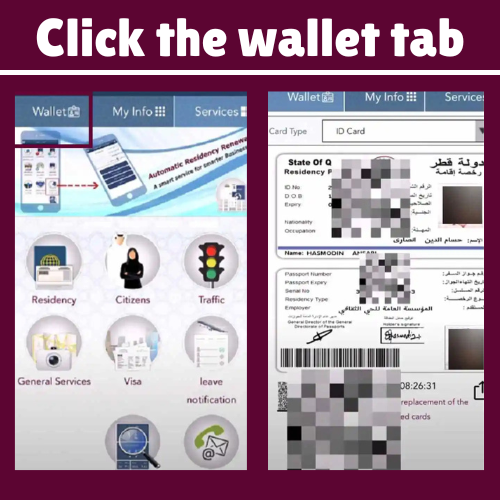
Step 4: Select Qatar ID
Select ID Card as the card type. To check another document, select it from the card type drop-down menu.

Qatar ID Check by Video Guide
Common Problems During Qatar ID Check (Easy Fixes)
Checking your Qatar ID online is simple, but sometimes users face small errors that stop them from seeing their QID status. The good news is that most of these problems are easy to fix if you know the reason.
Below are the most common issues and their simple solutions.
1. Invalid QID Number or “QID Not Found”
Why this happens:
- You entered the wrong QID number
- One or more digits are missing or incorrect
- Your QID is new and not updated yet
How to fix it
- Carefully check your 11-digit QID number
- Type it manually instead of copy-paste
- If your ID is new, wait 24 to 48 hours and try again
Helpful tip: Even a small mistake in one digit will show this error.
2. Incorrect Captcha Code
Sometimes you may see an “Incorrect Captcha Code” error.
Why this happens
- You entered the wrong verification code
- Letters or numbers were typed incorrectly
How to fix it
- Look carefully at the captcha image
- Enter the code exactly as shown
- If unclear, refresh the captcha and try again
Tip: Captcha is case-sensitive, so type it carefully.
3. Invalid Passport Number
If you are checking QID using your passport, this error can appear.
Why this happens
- Passport number is entered incorrectly
- Wrong nationality selected
How to fix it
- Keep your passport in front of you
- Enter the number exactly as printed
- Select the correct nationality
Tip: Do not add extra spaces or symbols.
4. Blank Page or No Response
Sometimes the page loads but shows nothing.
Why this happens
- Internet connection is weak
- Server is busy
- Browser issue
How to fix it
- Switch to a stable internet connection
- Try mobile data instead of WiFi
- Use another browser like Chrome or Edge
Real tip: This issue is common during peak hours.
5. Site Cannot Be Reached
This error appears when the MOI website is not accessible.
Why this happens
- Website is under maintenance
- Temporary server issue
- Network problem
How to fix it
- Wait and try again after some time
- Check again after a few hours or next day
- Contact your internet provider if the issue continues
Pro tip: Government websites often go under maintenance at night.
Importance of a Qatar ID Card
A Qatar ID (QID) proves your identity in Qatar. The document contains information such as your name, address, photo, nationality, ID number, signature, and expat sponsor information. Your residency and citizenship are also included.
The 11-digit ID number is linked with government databases, so it can be used to verify your information. You will also need a QID if you want to open a bank account, travel outside Qatar, get a driver’s license, or access government benefits.
What is Qatar ID?
QID, also known as the Qatar Identity Card, is a document that serves as a legal identification document for all Qatari. Qatari nationals and expatriates both require a QID to access various online services and information provided by the government.
What is Qatar ID Number?
Qatar ID numbers are 11-digit numbers issued to all Qatari residents, irrespective of their nationality. Qatar requires all residents to have an ID card as a means of identification.
What to Do If Your Qatar ID Is Expired?
Your Qatar ID must be renewed as soon as possible if it has expired. In case your Qatar ID is due to expire soon, you can apply for QID renewal now. Residents can renew their Qatar IDs up to 90 days before they expire by contacting the Ministry of Interior.
Hence, you should apply for Qatar ID Renew Online or in-person as soon as your Qatar ID expires. You can easily renew your Qatar ID with the MOI’s easy and quick QID Renewal Process.
What to Do If Your Qatar ID is Cancelled?
You can check your Qatar ID status by performing MOI Qatar QID Check Online. Qatar ID Status showing as “Cancelled” means the Ministry of Interior has cancelled your QID.
You must first find the reason for your QID cancellation before you can fix it.
1. Your employer or sponsor may have asked the MOI to cancel your Qatar ID because you left your job.
- Solution: Join your new employer and ask them to apply for your new Qatar ID as soon as possible.
2. Your employer or sponsor may report you as absent if you do not go to work for several days without informing them.
- Solution: Contact your employer, explain the issue, and ask them to help you activate your QID again.
3. Your QID may be cancelled if there is a legal issue or case against you in Qatar.
- Solution: Talk to your sponsor and a legal expert as soon as possible to solve the issue. Once the problem is cleared, your sponsor can apply for a new Qatar ID for you.
QID Number Structure and Meaning
Don’t worry if you don’t know where to check your QID. Just take a look at your Qatar ID card. Your card will have an 11-digit number in the middle. Below is an example of how this QID will look:
26863400752
QID is divided into four parts, each with its own meaning.

Part 1: Your first digit will be determined by your year of birth. You will have a 2 as the first digit of your QID if you were born from 1900 to 1999, but a 3 if you were born after 2000.
Part 2: The second and third digits are your Year of Birth (YOB). For example, you would enter ’89’ if you were born in 1989.
Part 3: Based on the ISO (International Organization for Standardization) code, the fourth, fifth, and sixth digits indicate your nationality. ISO codes are unique to each country. Turkey, for instance, has 792.
Part 4: Your YOB and ISO code’s last five digits are the unique sequence number.
Required Document For Qatar ID
New residents will receive a Qatar ID card once a medical check-up and fingerprinting has been completed. An MOI service center will issue a QID card after the sponsor submits the visa, passport, photo, and fee. Card printing usually takes place the same day, accessible via IDME KPM login.
How to Apply for a Qatar ID (QID)?
- Medical Examination & Blood Group Test: Within 2 to 5 days after arriving in Qatar, you’ll be scheduled for a medical exam. This includes an X-ray and a blood test at an approved medical facility to check general health and confirm your blood group.
- Fingerprints: After passing the medical exam, you’ll need to visit the Ministry of Interior (MOI) to provide fingerprints for security purposes.
- Residence Permit & Qatar ID Card Issuance: Once your medical exam and fingerprinting are complete, your sponsor will apply for your Residence Permit, which will lead to the issuance of your Qatar ID card.
Qatar ID (QID) Costs
| Service | Duration | Price (QAR) |
|---|---|---|
| Smart Card | – | 100 |
| Conventional ID Card | – | 100 |
| E-Gate Services | 1 year | 100 |
| E-Gate Services | 2 years | 150 |
| E-Gate Services | 3 years | 200 |
Qatar ID (QID) Processing Time
You will receive a response within 3-4 weeks after you submit your application. Your Qatar ID will be available at the designated MOI service center once you have been approved.
Benefits of Qatar ID (QID)
Owning a Qatar ID provides several essential benefits for residents:
- Legal Residency: Confirms your legal resident status in Qatar.
- Government Services: Grants access to various governmental facilities and services.
- Healthcare: Simplifies access to public and private healthcare systems.
- Education: Allows enrollment for children in schools and universities.
- Banking: Facilitates opening and managing bank accounts.
- Employment: Required for legal employment within Qatar.
- Travel: Eases travel across GCC countries.
- Property Rental: Necessary for renting homes or apartments.
- Utilities: Essential for setting up utilities like electricity and water.
- Driving License: Enables application for a Qatari driving license.
Services Available at the MOI Portal Qatar
The Ministry of Interior (MOI) offers a comprehensive range of online services through its official web portal. Both citizens and residents can conveniently access these services from any location whether at home or in the office using a mobile phone or computer.
MOI Online Inquiry Services
| Category | Services |
|---|---|
| Traffic Inquiries | • Traffic Violations • Traffic Reports • Certificates Inquiry |
| Visa Services Inquiries | • Visa Approval Tracking • Visa Inquiry and Printing • Visit Visa Extension • Track Application Status (Qatar Visa Center) |
| Exit & Entry Permits Inquiries | • Print Entry Permit • Leave Notification Inquiry • Leave Notification Application Form • Rowais Port Entry Permit • Diplomatic Area Entry Permit • Qatar Media Corp. Entry Permit • Abu Samrah Border Entry Permit • Hamad Port Entry Permit • Doha Port Entry Permit • Airport Entry Permit |
| Residency Permits Inquiry | • RP Application Tracking & Printing • RP Renewal Tracking • Permanent Residency Eligibility Inquiry • Print Entry Permit • Change Employer Application Inquiry |
| Other Inquiries | • Official Documents • Smart Card Application Form • Smart Card Activation Application Form • Inquiry on Company’s ID Particulars • Change Employer Application Inquiry |
| Metrash | • Metrash for Individuals • Metrash for Companies • Metrash Secondary Subscription |
| QPost Services | • QPost Requests Tracking |
| PCC Inquiry | • PCC Request Tracking |
| DCV Inquiry | • Query Digitally Signed and Stamped Documents |
| Search and Follow-up | • Overstay Violations Inquiry |
MOI Online E-Services
- Qatari Citizen Services
- Civil Defense Services
- Smart Card Services
- Visa Services
- NOC Services
- General Services
- Traffic Services
- Exit Permits Services
- Community Policing Services
- Residency Services
- Leave Notification Services
- Security System Services
- Cases Services
Contact Details for Qatar ID
- E-mail: [email protected]
- Phone: 2366666
- Web: www.portal.moi.gov.qa
FAQs About Qatar ID Check
Q 1: What is MOI Qatar?
Ans: MOI Qatar (وزارة الداخلية) is the government body responsible for public security, law enforcement, immigration, residency, traffic management, and civil defense. It provides key services like Qatar ID, visas, and traffic fine payments through its portal and Metrash app, ensuring safety, order, and smooth citizen services nationwide.
Q 2: How can I check my Qatar ID details?
Ans: Check Qatar ID Status Online: Steps to Follow
- Go to the MOI Portal. Select your preferred browser (Chrome, Firefox, Safari, etc.).
- Click on the Inquiries tab.
- Select Other Inquiries from the drop-down menu.
- Choose the Official Documents option.
- Your passport number or QID number should be entered.
- Check your status.
Q 3: What is Qatar digital ID?
Ans: Qatar Ministry of Interior launched the “Qatar Digital ID (QDI) Card” app on June 3, 2022. In its first phase, the app will verify residents’ digital identities in order to digitize access to Ministry services.
Q 4: How to check qid profession change status?
Ans: It is possible to check the status of a QID profession change request online either through the Ministry of Interior’s website or through the Ministry of Administrative Development, Labour and Social Affairs’ website (MADLSA). If you are using MADLSA, please log in, navigate to the “Recruitment” section, then click on “Profession Amendment Request”. By entering your QID and request number, you can “Track Request Status”.
Q 5: How do I check my ID card status?
Ans: Qatar ID (QID) status can be checked by visiting the Ministry of Interior’s website or using the Metrash app. To check the status of your application, you will need your 11-digit QID number or your passport number.
Q 6: How to check Qatar ID details?
Ans: Qatar ID details can be checked on the MOI website or the Metrash app. Navigate to the “Inquiries” section on the MOI website, then click “Official Documents,” and enter your QID number. After logging in to the Metrash app, you can view your QID information in the “Wallet” feature.
Q 7: What details can I see in a Qatar ID check?
Ans: When you check your Qatar ID online, you can see:
- Full name
- QID number
- Expiry date
- Visa type and residency status
- Sponsor information (for expats)
Q 8: How to check Qatar id cancel or not?
Ans: You can check if your Qatar ID is cancelled through the official Ministry of Interior (MOI) Qatar website or Metrash app. Enter your QID or passport number, complete verification, and review your residency status. If it shows “Cancelled” or “Inactive,” contact your sponsor immediately.
Q 9: What does it mean if my QID status shows “Under Process”?
Ans: “Under Process” on your Qatar ID (QID) means your application or renewal is still being checked by the Ministry of Interior (MOI) and is not completed yet.
Read Also
- Qatar ID Check
- Qatar ID Fine Check
- Qatar ID Expired
- How to Apply for Qatar ID?
- MOI Qatar ID Renewal Online
- How to Download QID From Metrash?
Conclusion
Having a valid Qatar ID is essential for residents, as it grants access to critical services like healthcare, banking, and government facilities. The Qatar ID Check feature on the MOI website provides a quick and user-friendly way to verify ID validity, helping residents avoid disruptions and stay updated on their legal status in Qatar. Regularly checking your QID status online ensures seamless access to necessary services and avoids last-minute renewal challenges.

Farhana Oberson 

Hi, I’m Farhana Oberson, the writer behind https://qataridcherckqa.com/ . I create simple guides about Qatar ID checks, visa services, and government procedures. My goal is to help residents and expats quickly understand official processes and complete their tasks without confusion.

